#[repr(u8)]pub enum Mix {
Show 16 variants    Normal = 0,
    Multiply = 1,
    Screen = 2,
    Overlay = 3,
    Darken = 4,
    Lighten = 5,
    ColorDodge = 6,
    ColorBurn = 7,
    HardLight = 8,
    SoftLight = 9,
    Difference = 10,
    Exclusion = 11,
    Hue = 12,
    Saturation = 13,
    Color = 14,
    Luminosity = 15,
}
Expand description
Defines the color mixing function for a blend operation.
See W3C’s Compositing and Blending Level 1 draft for more details. Illustrations fall under the W3C open license.
Variants§
Normal = 0
Default attribute which specifies no blending. The blending formula simply selects the source color.
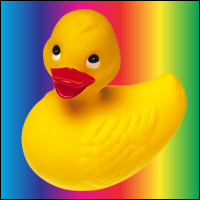
Multiply = 1
Source color is multiplied by the destination color and replaces the destination.
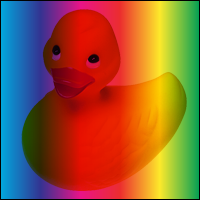
Screen = 2
Multiplies the complements of the backdrop and source color values, then complements the result.
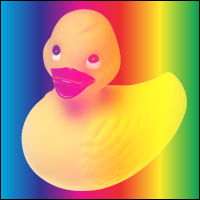
Overlay = 3
Multiplies or screens the colors, depending on the backdrop color value.
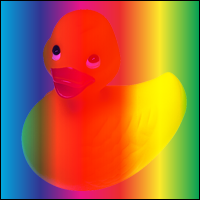
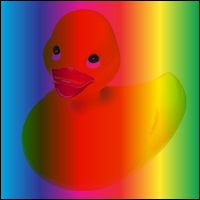
Darken = 4
Selects the darker of the backdrop and source colors.
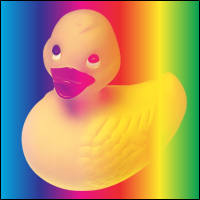
Lighten = 5
Selects the lighter of the backdrop and source colors.
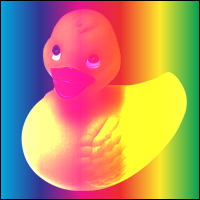
ColorDodge = 6
Brightens the backdrop color to reflect the source color. Painting with black produces no change.
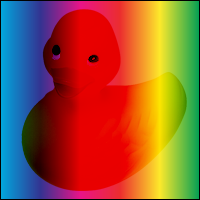
ColorBurn = 7
Darkens the backdrop color to reflect the source color. Painting with white produces no change.
HardLight = 8
Multiplies or screens the colors, depending on the source color value. The effect is similar to shining a harsh spotlight on the backdrop.
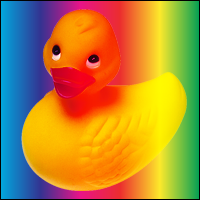
SoftLight = 9
Darkens or lightens the colors, depending on the source color value. The effect is similar to shining a diffused spotlight on the backdrop.
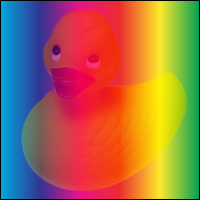
Difference = 10
Subtracts the darker of the two constituent colors from the lighter color.
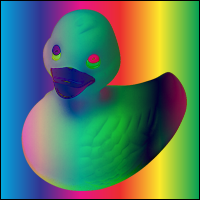
Exclusion = 11
Produces an effect similar to that of the Difference mode but lower in contrast. Painting
with white inverts the backdrop color; painting with black produces no change.
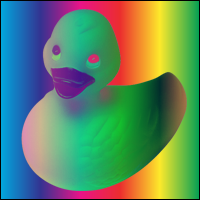
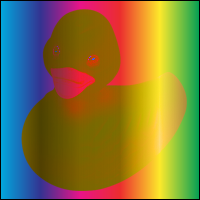
Hue = 12
Creates a color with the hue of the source color and the saturation and luminosity of the backdrop color.
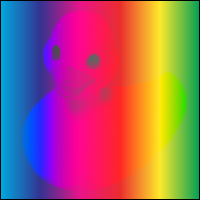
Saturation = 13
Creates a color with the saturation of the source color and the hue and luminosity of the backdrop color. Painting with this mode in an area of the backdrop that is a pure gray (no saturation) produces no change.
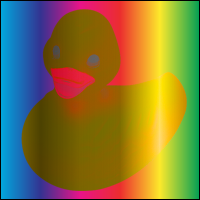
Color = 14
Creates a color with the hue and saturation of the source color and the luminosity of the backdrop color. This preserves the gray levels of the backdrop and is useful for coloring monochrome images or tinting color images.
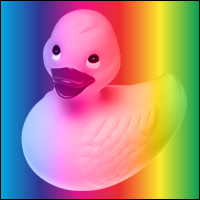
Luminosity = 15
Creates a color with the luminosity of the source color and the hue and saturation of the
backdrop color. This produces an inverse effect to that of the Color mode.
Trait Implementations§
Source§impl CheckedBitPattern for Mix
impl CheckedBitPattern for Mix
Source§type Bits = u8
type Bits = u8
Self must have the same layout as the specified Bits except for
the possible invalid bit patterns being checked during
is_valid_bit_pattern.Source§fn is_valid_bit_pattern(bits: &u8) -> bool
fn is_valid_bit_pattern(bits: &u8) -> bool
bits
as &Self.Source§impl Contiguous for Mix
impl Contiguous for Mix
Source§type Int = u8
type Int = u8
Source§fn from_integer(value: Self::Int) -> Option<Self>
fn from_integer(value: Self::Int) -> Option<Self>
value is within the range for valid instances of this type,
returns Some(converted_value), otherwise, returns None. Read moreSource§fn into_integer(self) -> Self::Int
fn into_integer(self) -> Self::Int
C into the underlying integral type. This
mostly exists otherwise generic code would need unsafe for the value as integer Read more